Hero Light

欢迎使用 Firecrawl

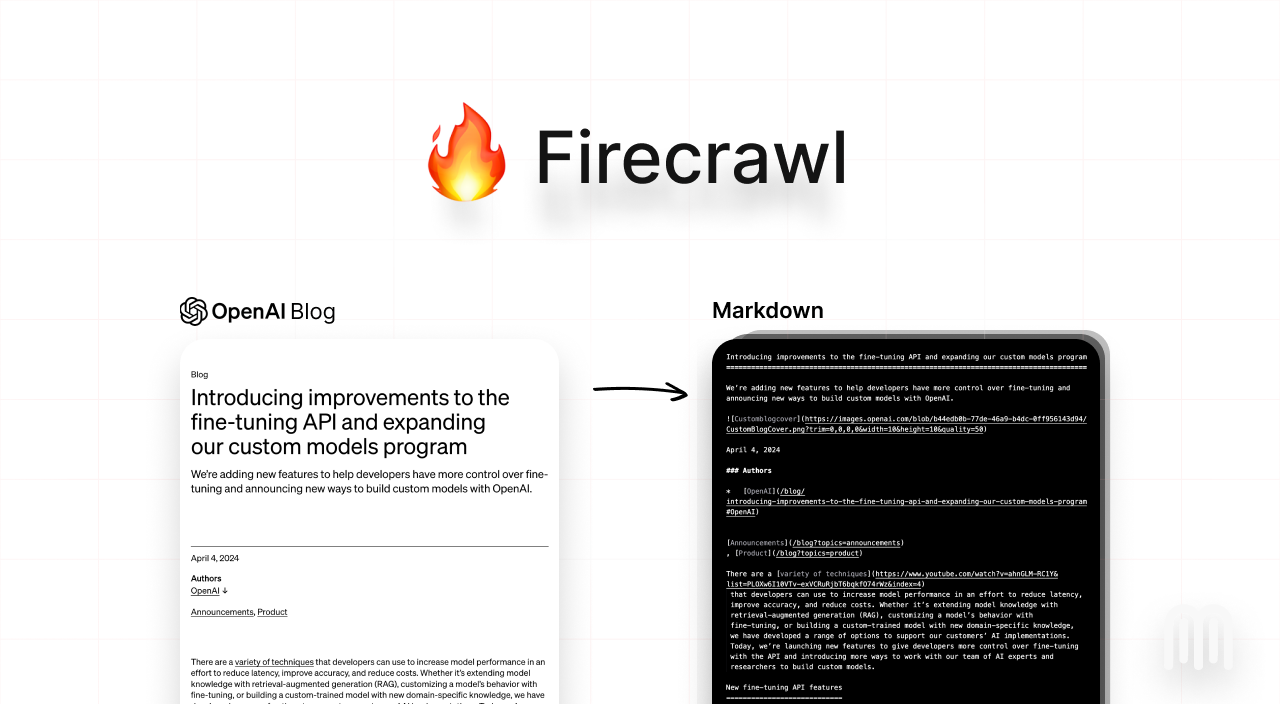
Firecrawl 是一个 API 服务,它接收 URL,爬取内容,并将其转换为干净的 markdown 格式。我们会爬取所有可访问的子页面,并为每个页面提供干净的 markdown。无需站点地图。

如何使用?

我们提供了一个易于使用的 API 和托管版本。您可以在这里找到 playground 和文档。您也可以自行托管后端。 查看以下资源开始使用: 自托管: 要自托管,请参考此处的指南。

API 密钥

要使用 API,您需要在 Firecrawl 上注册并获取 API 密钥。

功能

  • 抓取:抓取 URL 并获取 LLM 可用格式的内容(markdown、通过 LLM Extract 获取结构化数据、截图、HTML)
  • 爬取:抓取网页上的所有 URL 并以 LLM 可用格式返回内容
  • 映射:输入网站并获取所有网站 URL - 速度极快

强大的功能

  • LLM 可用格式:markdown、结构化数据、截图、HTML、链接、元数据
  • 处理困难任务:代理、反机器人机制、动态内容(js 渲染)、输出解析、编排
  • 可定制性:排除标签、使用自定义头信息爬取需要认证的网站、最大爬取深度等…
  • 媒体解析:PDF、docx、图像
  • 可靠性优先:设计用于获取您需要的数据 - 无论多么困难
  • 操作:在提取数据前进行点击、滚动、输入、等待等操作
您可以在我们的文档中找到 Firecrawl 的所有功能及其使用方法

爬取

用于爬取 URL 及其所有可访问的子页面。这会提交一个爬取任务并返回一个任务 ID,用于检查爬取状态。

安装

# 安装firecrawl-py包
pip install firecrawl-py

使用方法

from firecrawl import FirecrawlApp

app = FirecrawlApp(api_key="fc-YOUR_API_KEY")

# 爬取一个网站:
crawl_status = app.crawl_url(
  'https://firecrawl.dev', 
  params={
    'limit': 100, 
    'scrapeOptions': {'formats': ['markdown', 'html']}
  },
  poll_interval=30
)
print(crawl_status)
如果您使用 cURL 或 SDK 中的 async crawl 函数,这将返回一个 ID,您可以用它来检查爬取状态。
{
  "success": true,
  "id": "123-456-789",
  "url": "https://api.firecrawl.dev/v1/crawl/123-456-789"
}

检查爬取任务

用于检查爬取任务的状态并获取其结果。
# 检查爬取任务状态
crawl_status = app.check_crawl_status("<crawl_id>")
print(crawl_status)

响应

响应将根据爬取状态而有所不同。对于未完成或超过 10MB 的大型响应,将提供 next URL 参数。您必须请求此 URL 以检索下一个 10MB 的数据。如果 next 参数不存在,则表示爬取数据已结束。
{
  "status": "scraping",
  "total": 36,
  "completed": 10,
  "creditsUsed": 10,
  "expiresAt": "2024-00-00T00:00:00.000Z",
  "next": "https://api.firecrawl.dev/v1/crawl/123-456-789?skip=10",
  "data": [
    {
      "markdown": "[Firecrawl Docs home page![light logo](https://mintlify.s3-us-west-1.amazonaws.com/firecrawl/logo/light.svg)!...",
      "html": "<!DOCTYPE html><html lang=\"en\" class=\"js-focus-visible lg:[--scroll-mt:9.5rem]\" data-js-focus-visible=\"\">...",
      "metadata": {
        "title": "Build a 'Chat with website' using Groq Llama 3 | Firecrawl",
        "language": "en",
        "sourceURL": "https://docs.firecrawl.dev/learn/rag-llama3",
        "description": "Learn how to use Firecrawl, Groq Llama 3, and Langchain to build a 'Chat with your website' bot.",
        "ogLocaleAlternate": [],
        "statusCode": 200
      }
    },
    ...
  ]
}

抓取

要抓取单个 URL,请使用 scrape_url 方法。它接受 URL 作为参数,并以字典形式返回抓取的数据。
from firecrawl import FirecrawlApp

app = FirecrawlApp(api_key="fc-YOUR_API_KEY")

# Scrape a website:
scrape_result = app.scrape_url('firecrawl.dev', params={'formats': ['markdown', 'html']})
print(scrape_result)

响应

SDK 将直接返回数据对象。cURL 将返回与下面完全相同的负载。
{
  "success": true,
  "data" : {
    "markdown": "Launch Week I is here! [See our Day 2 Release 🚀](https://www.firecrawl.dev/blog/launch-week-i-day-2-doubled-rate-limits)[💥 Get 2 months free...",
    "html": "<!DOCTYPE html><html lang=\"en\" class=\"light\" style=\"color-scheme: light;\"><body class=\"__variable_36bd41 __variable_d7dc5d font-inter ...",
    "metadata": {
      "title": "Home - Firecrawl",
      "description": "Firecrawl crawls and converts any website into clean markdown.",
      "language": "en",
      "keywords": "Firecrawl,Markdown,Data,Mendable,Langchain",
      "robots": "follow, index",
      "ogTitle": "Firecrawl",
      "ogDescription": "Turn any website into LLM-ready data.",
      "ogUrl": "https://www.firecrawl.dev/",
      "ogImage": "https://www.firecrawl.dev/og.png?123",
      "ogLocaleAlternate": [],
      "ogSiteName": "Firecrawl",
      "sourceURL": "https://firecrawl.dev",
      "statusCode": 200
    }
  }
}

提取

通过 LLM 提取,您可以轻松地从任何 URL 中提取结构化数据。我们还支持 pydantic 模式,使其更易于使用。以下是使用方法: v1 目前仅支持 node、python 和 cURL。
from firecrawl import FirecrawlApp
from pydantic import BaseModel, Field

# 使用你的API密钥初始化FirecrawlApp
app = FirecrawlApp(api_key='your_api_key')

class ExtractSchema(BaseModel):
    company_mission: str
    supports_sso: bool
    is_open_source: bool
    is_in_yc: bool

data = app.scrape_url('https://docs.firecrawl.dev/', {
    'formats': ['extract'],
    'extract': {
        'schema': ExtractSchema.model_json_schema(),
    }
})
print(data["extract"])
输出:
JSON
{
    "success": true,
    "data": {
      "extract": {
        "company_mission": "Train a secure AI on your technical resources that answers customer and employee questions so your team doesn't have to",
        "supports_sso": true,
        "is_open_source": false,
        "is_in_yc": true
      },
      "metadata": {
        "title": "Mendable",
        "description": "Mendable allows you to easily build AI chat applications. Ingest, customize, then deploy with one line of code anywhere you want. Brought to you by SideGuide",
        "robots": "follow, index",
        "ogTitle": "Mendable",
        "ogDescription": "Mendable allows you to easily build AI chat applications. Ingest, customize, then deploy with one line of code anywhere you want. Brought to you by SideGuide",
        "ogUrl": "https://docs.firecrawl.dev/",
        "ogImage": "https://docs.firecrawl.dev/mendable_new_og1.png",
        "ogLocaleAlternate": [],
        "ogSiteName": "Mendable",
        "sourceURL": "https://docs.firecrawl.dev/"
      },
    }
}

无模式提取(新功能)

现在您可以通过仅向端点传递 prompt 来进行无模式提取。LLM 会自行选择数据结构。
curl -X POST https://api.firecrawl.dev/v1/scrape \
    -H 'Content-Type: application/json' \
    -H 'Authorization: Bearer YOUR_API_KEY' \
    -d '{
      "url": "https://docs.firecrawl.dev/",
      "formats": ["extract"],
      "extract": {
        "prompt": "从页面中提取公司使命。"
      }
    }'
输出:
JSON
{
    "success": true,
    "data": {
      "extract": {
        "company_mission": "Train a secure AI on your technical resources that answers customer and employee questions so your team doesn't have to",
      },
      "metadata": {
        "title": "Mendable",
        "description": "Mendable allows you to easily build AI chat applications. Ingest, customize, then deploy with one line of code anywhere you want. Brought to you by SideGuide",
        "robots": "follow, index",
        "ogTitle": "Mendable",
        "ogDescription": "Mendable allows you to easily build AI chat applications. Ingest, customize, then deploy with one line of code anywhere you want. Brought to you by SideGuide",
        "ogUrl": "https://docs.firecrawl.dev/",
        "ogImage": "https://docs.firecrawl.dev/mendable_new_og1.png",
        "ogLocaleAlternate": [],
        "ogSiteName": "Mendable",
        "sourceURL": "https://docs.firecrawl.dev/"
      },
    }
}

提取 (v0)


app = FirecrawlApp(version="v0")

class ArticleSchema(BaseModel):
    title: str
    points: int 
    by: str
    commentsURL: str

class TopArticlesSchema(BaseModel):
top: List[ArticleSchema] = Field(..., max_items=5, description="Top 5 stories")

data = app.scrape_url('https://news.ycombinator.com', {
'extractorOptions': {
'extractionSchema': TopArticlesSchema.model_json_schema(),
'mode': 'llm-extraction'
},
'pageOptions':{
'onlyMainContent': True
}
})
print(data["llm_extraction"])

通过操作与页面交互

Firecrawl 允许您在抓取网页内容之前执行各种操作。这对于与动态内容交互、在页面间导航或访问需要用户交互的内容特别有用。 以下是一个使用操作导航到 google.com,搜索 Firecrawl,点击第一个结果并截图的示例。 在执行其他操作前后使用 wait 操作几乎总是很重要的,这可以给页面足够的加载时间。

示例

from firecrawl import FirecrawlApp

app = FirecrawlApp(api_key="fc-YOUR_API_KEY")

# Scrape a website:
scrape_result = app.scrape_url('firecrawl.dev', 
    params={
        'formats': ['markdown', 'html'], 
        'actions': [
            {"type": "wait", "milliseconds": 2000},
            {"type": "click", "selector": "textarea[title=\"Search\"]"},
            {"type": "wait", "milliseconds": 2000},
            {"type": "write", "text": "firecrawl"},
            {"type": "wait", "milliseconds": 2000},
            {"type": "press", "key": "ENTER"},
            {"type": "wait", "milliseconds": 3000},
            {"type": "click", "selector": "h3"},
            {"type": "wait", "milliseconds": 3000},
            {"type": "scrape"},
            {"type": "screenshot"}
        ]
    }
)
print(scrape_result)

输出

{
  "success": true,
  "data": {
    "markdown": "Our first Launch Week is over! [See the recap 🚀](blog/firecrawl-launch-week-1-recap)...",
    "actions": {
      "screenshots": [
        "https://alttmdsdujxrfnakrkyi.supabase.co/storage/v1/object/public/media/screenshot-75ef2d87-31e0-4349-a478-fb432a29e241.png"
      ],
      "scrapes": [
        {
          "url": "https://www.firecrawl.dev/",
          "html": "<html><body><h1>Firecrawl</h1></body></html>"
        }
      ]
    },
    "metadata": {
      "title": "Home - Firecrawl",
      "description": "Firecrawl crawls and converts any website into clean markdown.",
      "language": "en",
      "keywords": "Firecrawl,Markdown,Data,Mendable,Langchain",
      "robots": "follow, index",
      "ogTitle": "Firecrawl",
      "ogDescription": "Turn any website into LLM-ready data.",
      "ogUrl": "https://www.firecrawl.dev/",
      "ogImage": "https://www.firecrawl.dev/og.png?123",
      "ogLocaleAlternate": [],
      "ogSiteName": "Firecrawl",
      "sourceURL": "http://google.com",
      "statusCode": 200
    }
  }
}

开源版与云版

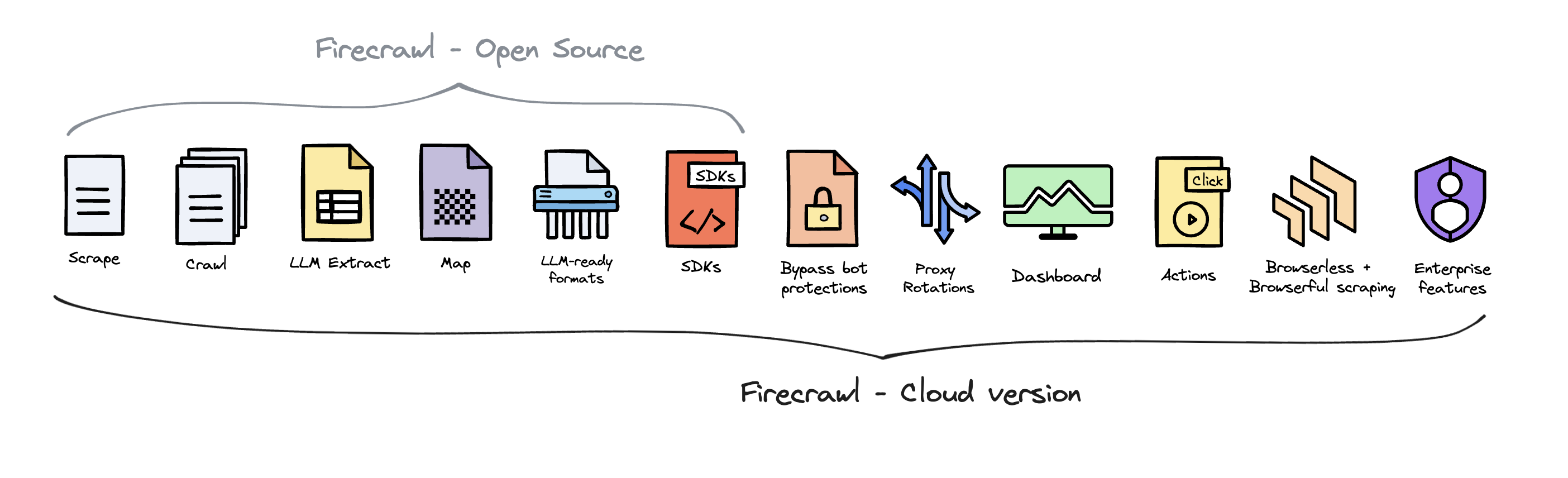
Firecrawl 是开源的,使用 AGPL-3.0 许可证 为了提供最好的产品,我们在开源版本的基础上提供了 Firecrawl 的托管版本。云解决方案使我们能够不断创新并为所有用户维护高质量、可持续的服务。 Firecrawl Cloud 可在 firecrawl.dev 获取,并提供开源版本中不可用的一系列功能: Firecrawl Cloud vs Open Source
贡献

我们欢迎贡献!在提交拉取请求之前,请阅读我们的贡献指南